Kid Tutorial:Spelling Learning1.1
Publisher Description
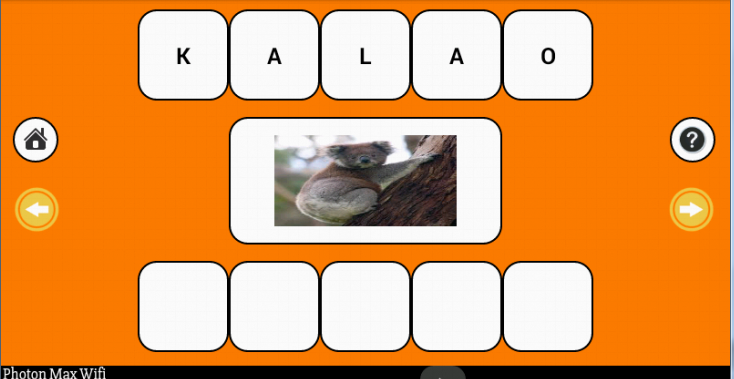
English Spelling learning for children is toughest for kids but Learn spelling with game helps kids to Learn spelling easily and kids enjoy speling game with fun and in easy way. Kids can learn speling of vegitable, spelling of fruits, spelling of days, spelling of month, spelling of number, spelling of month, spelling of animals. This learn spelling app kids can also know how to pronounce the spelling. Kids can also learn Fruits, Vegetables, animals, shapes, numbers, days by real picture with spelling and pronunciation. it will skill kids to developed words and increase their vocabulary and understanding about the things around.
Kids can developed speling by its pronunciation of english word and learn it. It helps kids in how to spell and recognize alphabets, words with picture.
It increases their analysis and identification , word building and phonic sound ability.
How to Use
Kids will see the picture of the selected category like Fruit, Vegi, Animal , Number
Application will show the object and its spelling in random order.
Kids has to drag letter in the correct sequence of the word.
Help icon helps kids to How to spell the word.
If kids touch the picture then it will pronounce the word.
Learn English word with spelling telling
User can there own words and kids can learn it.
How to add new words?
Click on Add new Word -> Enter words -> Click Add word
How to show Custom Word?
Click on MyWord -> Start Learning
How to Delete Custom Word?
Click on MyWord -> Click Show My Word -> Click on word which you wand to delete
About Kid Tutorial:Spelling Learning
The company that develops Kid Tutorial:Spelling Learning is Edutechmiles.com - Smart Learning App. The latest version released by its developer is 1.1.
To install Kid Tutorial:Spelling Learning on your Android device, just click the green Continue To App button above to start the installation process. The app is listed on our website since 2015-07-18 and was downloaded 7 times. We have already checked if the download link is safe, however for your own protection we recommend that you scan the downloaded app with your antivirus. Your antivirus may detect the Kid Tutorial:Spelling Learning as malware as malware if the download link to com.kids.learnspelling is broken.
How to install Kid Tutorial:Spelling Learning on your Android device:
- Click on the Continue To App button on our website. This will redirect you to Google Play.
- Once the Kid Tutorial:Spelling Learning is shown in the Google Play listing of your Android device, you can start its download and installation. Tap on the Install button located below the search bar and to the right of the app icon.
- A pop-up window with the permissions required by Kid Tutorial:Spelling Learning will be shown. Click on Accept to continue the process.
- Kid Tutorial:Spelling Learning will be downloaded onto your device, displaying a progress. Once the download completes, the installation will start and you'll get a notification after the installation is finished.
Program Details
System requirements
Download information
Pricing
Version History
version 1.1
posted on 2015-07-18
1. User now add there own words give to there kids to Learn.,2. Frequency of Ad is reduced.
